Building Information Modelling
What is Building Information Modeling (BIM)?
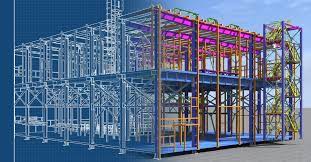
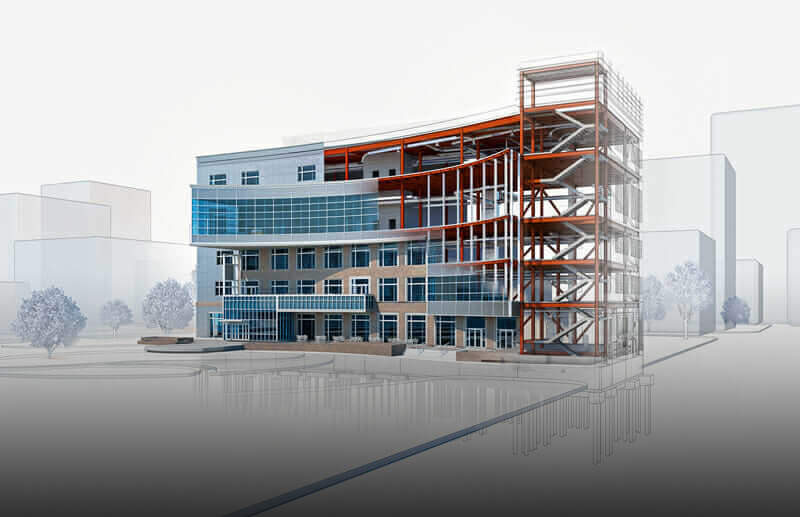
Building Information Modeling (BIM) is an intelligent, 3D model-based process that provides architects, engineers, and construction professionals with the tools to design, visualize, simulate, and manage buildings and infrastructure more efficiently. BIM integrates data-rich models with collaborative workflows, enabling seamless coordination throughout a project's lifecycle.
BIM is not just 3D modeling—it includes additional dimensions such as cost estimation, scheduling, sustainability analysis, and facility management, making it a crucial tool in modern construction.
1. Key Aspects of BIM
BIM involves several critical components that streamline construction workflows:
A. 3D Modeling & Visualization
Generates highly detailed 3D models of buildings and infrastructure.
Allows stakeholders to visualize design concepts before construction.
Detects potential design conflicts early.
B. Data Integration & Collaboration
Centralized information storage ensures all project members work with accurate, up-to-date data.
Enhances communication between architects, engineers, contractors, and owners.
Reduces errors caused by outdated drawings or miscommunication.
C. Multi-Dimensional BIM (3D, 4D, 5D, 6D, 7D)
BIM extends beyond 3D models, incorporating additional dimensions:
3D (Geometry & Visualization) – Digital representation of the structure.
4D (Time & Scheduling) – Links construction sequences to the model.
5D (Cost Estimation) – Provides real-time cost data and budgeting.
6D (Sustainability & Energy Analysis) – Evaluates energy performance and environmental impact.
7D (Facility Management & Maintenance) – Supports lifecycle management and asset tracking.
D. Clash Detection & Coordination
Identifies conflicts between different disciplines (e.g., steel structure vs. HVAC).
Minimizes costly rework by resolving issues before construction starts.
Uses automated tools for clash detection (e.g., Navisworks).
E. Quantity Takeoff & Cost Estimation
Automates material takeoff, improving accuracy.
Reduces manual errors in cost estimation.
Helps contractors and project managers with budgeting and procurement.
F. Construction Simulation & Scheduling
Simulates construction sequences to optimize efficiency.
Helps plan logistics, reducing downtime and delays.
Enhances safety by identifying potential hazards before construction.
G. Facility Management & Maintenance (FM)
Links building components with maintenance schedules.
Integrates IoT (Internet of Things) for real-time monitoring.
Enhances long-term asset management.
2. BIM Software & Tools
BIM relies on advanced software platforms for modeling, analysis, and collaboration. Some of the most popular BIM software include:
A. 3D Modeling & Design
Autodesk Revit – The most widely used BIM software for architectural and structural modeling.
ArchiCAD – A powerful BIM tool for architects and designers.
Bentley AECOsim – Used for infrastructure and large-scale projects.
B. Collaboration & Coordination
Navisworks – Used for clash detection and model coordination.
BIM 360 – A cloud-based collaboration platform.
Trimble Connect – Helps in model sharing and coordination.
C. Structural & MEP Analysis
Tekla Structures – Advanced steel detailing and connection design.
Dynamo for Revit – Automates repetitive tasks using computational design.
Robot Structural Analysis – Performs structural load and stress analysis.
D. Cost Estimation & Scheduling
Vico Office – Links cost and schedule to the BIM model.
Synchro Pro – 4D BIM scheduling software.
CostX – Extracts quantities and manages cost estimation.
3. Benefits of BIM
BIM provides significant advantages to all stakeholders in a construction project:
A. Improved Efficiency & Productivity
rework by detecting issues early.
Automates workflows, saving time and effort.
B. Enhanced Collaboration & Communication
Ensures all teams work with a single source of truth.
Cloud-based platforms allow real-time collaboration
C. Cost & Time Savings
Optimizes material usage, reducing waste.
Minimizes delays through better project scheduling.
D. Higher Accuracy & Reduced Errors
Eliminates inconsistencies in design and documentation.
Enhances precision in quantity takeoff and budgeting.
E. Sustainable & Energy-Efficient Design
Enables energy simulations to optimize building performance.
Supports green building certifications (e.g., LEED, BREEAM).
F. Better Facility Management
Helps in preventive maintenance and asset tracking.
Improves long-term building performance.
4. Challenges in BIM Adoption
Despite its benefits, BIM adoption faces several challenges:
A. High Initial Investment
Software licensing and training costs can be expensive.
Requires skilled professionals.
B. Resistance to Change
Some traditional construction firms hesitate to switch to digital workflows.
Lack of awareness and reluctance to adopt new technology.
C. Data Management & Interoperability Issues
Different BIM software may have compatibility challenges.
Requires standardization in data exchange formats.
D. Legal & Contractual Issues
Unclear ownership of BIM data and intellectual property.
Legal risks related to data sharing and liability.
5. BIM Levels & Maturity
BIM implementation is categorized into different levels of maturity:
BIM Level 0 – Traditional 2D CAD drawings, no collaboration.
BIM Level 1 – 2D & 3D CAD models with limited collaboration.
BIM Level 2 – Full 3D modeling with data sharing and collaboration.
BIM Level 3 – Fully integrated BIM with real-time cloud-based collaboration.
Conclusion
Building Information Modeling (BIM) is transforming the construction industry by enhancing collaboration, reducing costs, and improving project efficiency. With advancements in technology and increased adoption, BIM is becoming the standard for modern construction projects.
Would you like assistance in BIM implementation for a specific project, software selection, or training recommendations?